
Logo
登录
Logo

最专注于开发者的语音AI平台

ISO 27001
ISO 27001
SOC 2
SOC 2
SSL/TLS
SSL/TLS
APPI
APPI
产品
  • 实时语音识别
  • 录音文件转写
  • 语音合成
  • 发音评测
  • DolphinTeams 双屏机
  • Tralingo AI翻译机
  • NihongoScore
资源
  • 文档
  • 博客
  • AI 应用
  • 在线体验
公司
  • 关于我们
  • 联系我们
  • 客户
法律
  • 隐私政策
  • 服务条款
  • 服务级别协议(SLA)
  • 基于特定商业交易法的标注
  • DolphinTeams 使用手册
© 2026 DolphinVoice All Rights Reserved.
产品Extract Monster
Extract Monster

Extract Monster

AI Extract API: Documents, Audios, Videos to Structured JSON

3 点赞访问网站
Extract Monster Screenshot
Extract Monster Preview
访问网站

Introduction to Extract Monster

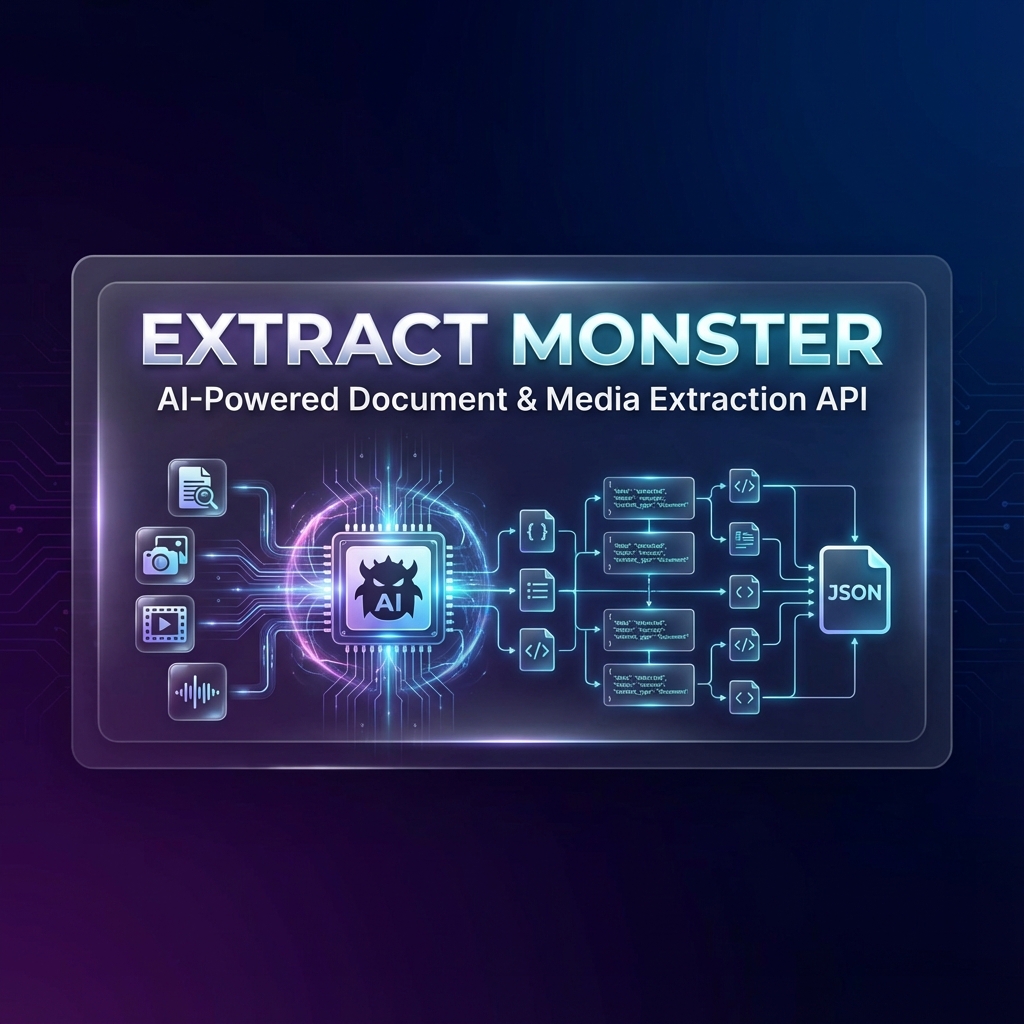
Extract Monster is an AI-powered extraction API designed to convert a wide range of file types—including documents, audio, video, and more—into structured JSON data with high accuracy and speed. Whether you're working with invoices, driver's licenses, credit cards, or multilingual signs, Extract Monster provides a robust solution for transforming unstructured data into actionable insights. The platform supports integration with popular workflow automation tools like n8n and is set to expand support to Power Automate and other platforms in the near future.

The API is engineered to handle complex data extraction tasks, leveraging advanced AI models to understand and process visual, textual, and auditory content. Users can define custom JSON schemas to extract only the specific data they need from their files. This flexibility makes Extract Monster ideal for businesses looking to automate data entry, streamline document processing, and improve operational efficiency. With a user-friendly interface and a powerful backend, Extract Monster offers a seamless experience for developers and non-technical users alike.

Takeaways

  • AI-powered extraction of documents, audio, video, and more into structured JSON
  • Support for n8n as a community node; expansion to Power Automate and other platforms coming soon
  • Custom schema definition for precise data extraction
  • High accuracy and speed for various file types including invoices, identity documents, financial cards, and more
  • Free trial available with 100 API calls; scalable pricing plans for different needs

How Extract Monster Works

Extract Monster uses a sophisticated pipeline that includes multimodal data processing, feature fusion, and intelligent analysis to transform raw file data into structured JSON. The process involves:

  1. Input & Encoding: Raw files are encoded using visual and text encoders to capture content and context.
  2. Feature Fusion: Advanced attention mechanisms combine visual and linguistic data for deep contextual understanding.
  3. Extraction LLM: An AI model performs visual-linguistic analysis, OCR, and document parsing to extract relevant information.
  4. Response Formatting: Extracted data is formatted according to the user-defined schema and validated for accuracy.
  5. Structured Output: Final output is delivered as production-ready JSON data.

Core Benefits and Applications

BenefitDescription
SpeedFast processing of large volumes of files
AccuracyHigh precision in extracting structured data
FlexibilityCustomizable schema for tailored data extraction
ScalabilitySuitable for individual use, small businesses, and enterprise-level applications
IntegrationSupports n8n and upcoming support for Power Automate

Extract Monster is ideal for industries such as finance, healthcare, logistics, and customer service, where efficient data extraction from various file formats is critical.
标签

#AI Extraction#JSON Output#Document Parsing#Audio Transcription#Video Analysis#Custom Schemas#n8n Integration#Power Automate#Data Automation#File Conversion

精品推荐

Guideflow

Guideflow

The AI demo automation platform for SaaS

1259
CyberCut AI

CyberCut AI

AI video studio for viral social clips

706
Incredible

Incredible

Deep Work AI Agents - powered by Agent MAX

653
Typeless

Typeless

AI voice dictation that's actually intelligent

625

在 AI Apps 上免费展示您的应用

加入我们的创新者社区,让您的 AI 工具触达成千上万的每日用户。

申请展示
DolphinVoice Console

BlogPage.PromoContent.title

BlogPage.PromoContent.description

BlogPage.PromoContent.cta

