

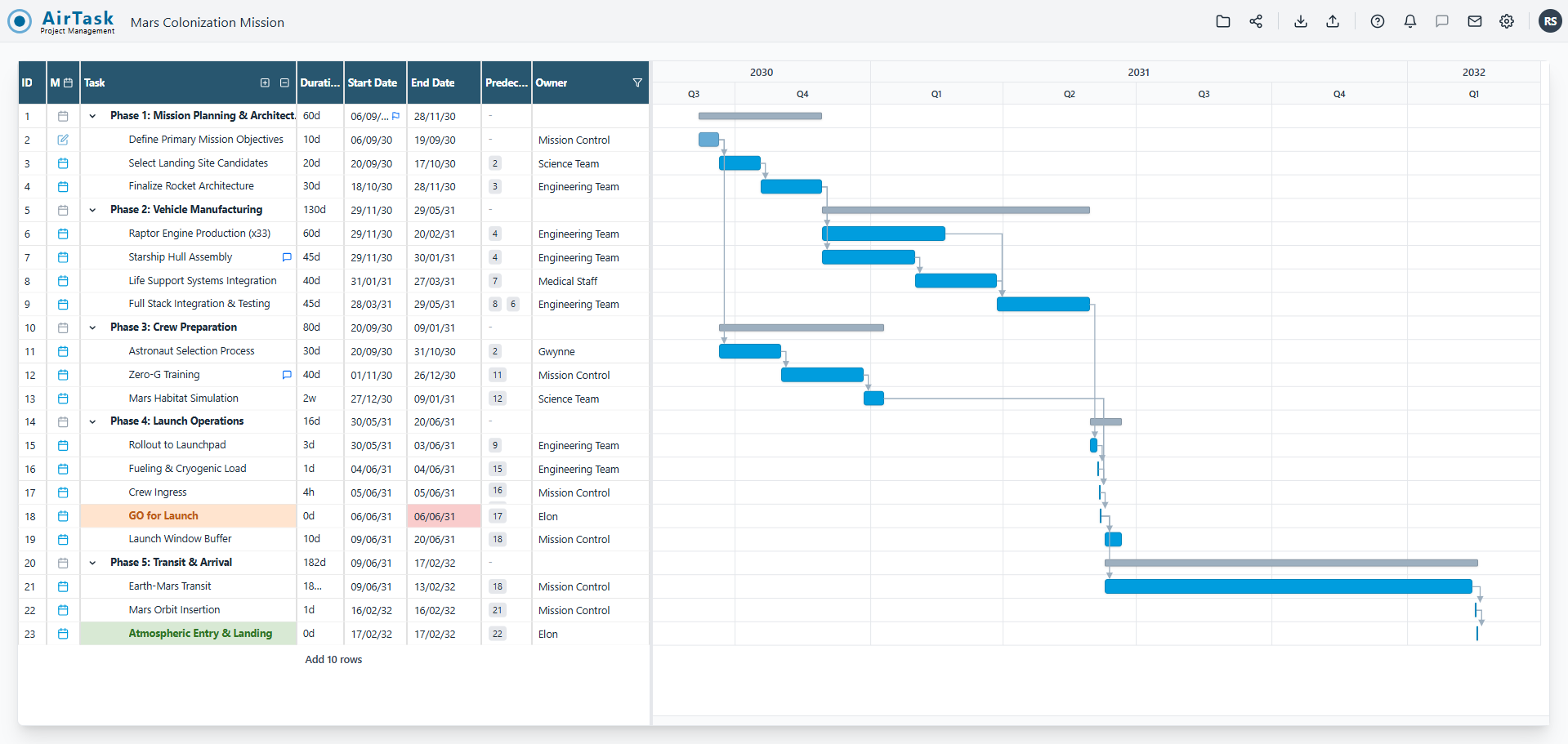
Introduction to AirTask Project Management
AirTask is a modern project management tool designed to simplify the planning and scheduling process. Unlike traditional Gantt chart software, which often requires manual updates and complex configurations, AirTask leverages an intelligent auto-scheduling engine to dynamically adjust project timelines based on changes in task durations or dates. It offers a fast, intuitive interface that combines the power of critical path analysis with ease of use, making it an ideal alternative to tools like Microsoft Project.
With a focus on team collaboration and real-time insights, AirTask helps project managers and teams stay aligned and proactive. From automated schedule recalculations to interactive timeline views and keyboard-first efficiency, AirTask streamlines the entire project lifecycle. Whether you're managing small tasks or large-scale projects, AirTask provides the tools needed to plan smarter and work faster.
Takeaways
- Intelligent auto-scheduling that updates the entire project timeline instantly
- Interactive Gantt chart with drag-and-drop dependencies (FS, SS, FF, SF)
- Keyboard-driven interface for increased speed and productivity
- Contextual collaboration features including task comments and risk flags
- Schedule baseline tracking to compare current progress against original plans
- Real-time project insights with health metrics and workload analysis
- GDPR compliance and European hosting for data privacy
- Flexible import/export options to integrate with existing workflows
How AirTask Works
AirTask operates by allowing users to define tasks, set dependencies, and establish start/end dates. Once these elements are in place, the system automatically calculates the critical path and adjusts the schedule whenever any change occurs. This eliminates the need for manual updates and ensures that the project plan remains accurate and up-to-date at all times.
Users can interact with the Gantt chart by dragging and dropping tasks, creating dependencies, and zooming in/out to view different time frames. The keyboard-first design enables quick task creation, structuring, and navigation without requiring mouse input. Additionally, AirTask provides real-time feedback on project health, such as risk levels, workload balance, and schedule slippage, helping teams make informed decisions.
Core Benefits and Applications
| Benefit | Description |
|---|---|
| Time Efficiency | Auto-scheduling reduces the time spent on manual updates |
| Collaboration | Integrated comments and risk flags keep teams aligned |
| Accuracy | Critical path logic ensures correct project sequencing |
| Flexibility | Import from MS Project and export to PDF/Excel |
| Transparency | Baseline tracking and visual comparisons help monitor progress |
| Scalability | Suitable for both small and large project environments |
| Accessibility | Web-based interface accessible from any device |
AirTask is ideal for project managers, teams, and organizations looking to streamline their planning processes while maintaining precision and control over their schedules.
Featured




Showcase your app on AI Apps for free
Join our community of innovators and get your AI tool in front of thousands of daily users.
Get Featured