
12 Transcription APIs Compared
Compare pricing, Japanese support, long-file limits, Speaker Separation, data protection, and on-premises deployment to find an API for your use case. Information reflects October 2026.
You may want to turn recorded meetings into text, transcribe Call Center recordings in bulk for analysis, or process interviews inside your own product without outsourcing. A transcription API provides the building block for these workflows.
This article is written by DolphinAI Inc., the company behind the DolphinVoice transcription API. Because our own service is included, this is a comparison, not a ranking. We present figures from providers’ public pricing pages, API references, and data policies, and explain how to interpret them. A separate section covers DolphinVoice, including situations where another service may be a better fit.
The market has changed considerably in the second half of 2026. ElevenLabs introduced Scribe v2 and its realtime counterpart; Microsoft previewed MAI-Transcribe-2 at $0.10 per hour; AssemblyAI released Universal-3.6 Pro and expanded streaming to 32 languages; and Deepgram added the streaming-only Flux model. Many comparisons written earlier in the year do not yet cover these changes. We track providers for our own development and sales work and have compiled this October 2026 snapshot.
We first examine six selection criteria: pricing, Japanese support, long files, Speaker Separation and custom dictionaries, data handling, and on-premises deployment. We then compare 12 services to help you evaluate candidates for your product.
What is a transcription API? Batch and realtime processing
Technically, a transcription API and a Speech Recognition API (STT/ASR) refer to the same underlying capability. In practice, they often emphasize different workflows.
A transcription API usually means batch or asynchronous processing of recorded audio and video. Typical uses include meeting recordings, interviews, recorded calls, and video subtitles. The priorities are processing long files affordably, quickly, and accurately. Live text during a call or responses from a voice bot instead rely on realtime streaming, where latency is central.
This article focuses on batch processing while also noting realtime availability. Batch and realtime rates can differ by 1.5 to 3 times within one service, so establish which workflow you need first.
There is also a distinction between a finished SaaS application and an API. SaaS lets users upload audio in a browser and edit the result. An API accepts audio over HTTP or WebSocket and returns JSON. This comparison covers APIs for embedding transcription in your own product.
Six criteria for choosing a transcription API
Pricing: compare the total cost per audio hour
For recorded-file transcription, compare batch or asynchronous rates on a per-hour basis. A price of $0.006 per minute cannot be compared directly with $0.21 per hour.
- Billing unit: multiply the per-minute rate by 60.
- Currency and tax: international providers generally quote US dollars excluding tax; Japanese providers commonly quote yen including tax.
- Exchange rate: this article uses approximately ¥158 per US dollar for October 2026. A weaker yen increases yen-denominated costs even if the dollar price stays unchanged.
- Add-ons: check whether Speaker Separation, personally identifiable information (PII) redaction, and summarization cost extra.
Exchange-rate exposure becomes more significant at higher monthly volumes. For a dollar-priced API, include scenarios with a 10% move in either direction in your cost plan.
Add-ons are easy to miss. AssemblyAI charges an extra $0.02 per hour for prerecorded Speaker Separation and $0.12 per hour for streaming. ElevenLabs adds 10% for speaker-role detection. The order of services by cost can change once all required features are included.
Japanese: check model support and recognition accuracy
Confirm Japanese support at the model level. Even in October 2026, models from the same provider differ.
AssemblyAI illustrates this distinction. In August 2026, its streaming service supported six languages without Japanese. Universal-3.5 Pro Streaming and Universal-3.6 Pro Streaming now support Japanese. However, the cheaper Universal-Streaming model at $0.15 per hour still supports only English, Spanish, German, French, Portuguese, and Italian. A budget based on the cheaper rate may therefore need a model priced at $0.45 per hour instead.
Deepgram treats Japanese as multilingual usage. Prerecorded Japanese audio is billed at $0.0052 per minute, rather than the $0.0043 English monolingual rate.
Microsoft’s MAI-Transcribe-2 is aggressively priced at $0.10 per hour, but its official blog does not provide a language list, so Japanese support remains unconfirmed. Price alone is insufficient grounds for choosing it.
Providers frequently claim industry-leading accuracy, but we did not find an official Japanese-specific word error rate (WER) in the public pages we reviewed. English benchmark results do not guarantee Japanese performance. This limitation applies to us too: Japanese accuracy needs to be measured on real data.
Long recordings: check file limits and processing time
For batch transcription, file limits can determine how much integration work is needed.
OpenAI limits uploads to 25MB. The estimates used here are slightly under two hours of MP3 or around ten minutes of WAV. A two-hour meeting video cannot simply be submitted without implementing splitting and merging, and discovering that restriction mid-project can cause rework. In contrast, ElevenLabs accepts up to 1GB or 4.5 hours, while DolphinVoice accepts 1GB of audio, 2GB of video, and up to five hours. Speechmatics specifies a two-hour or 4GB limit for its on-premises batch container.
Processing Speed also matters. Azure states that batch processing is generally around five times faster than realtime, with 90% of jobs completing within six hours and peak delays potentially reaching 24 hours. That can suit an upload-in-the-morning, collect-in-the-evening workflow, but not a user waiting at a screen. Different batch processing times allow different user experiences.
 Maximum duration supported in a single file
Features: check Speaker Separation and custom dictionaries
Speaker Separation (diarization) supports up to 30 speakers with Amazon Transcribe and 32 with ElevenLabs. ElevenLabs also offers optional role detection to distinguish agents from customers. AssemblyAI accepts an expected speaker count or range. Speechmatics offers separation by voice, by channel, or both. OpenAI uses the dedicated gpt-4o-transcribe-diarize model. If agents and customers can be recorded on separate channels, channel separation is generally more reliable and less expensive than separating voices within one channel.
Custom dictionaries and keyword boosting have very different limits. Deepgram allows up to 100 words and 500 tokens. Speechmatics allows up to 1,000 words per job, including pronunciation hints; Japanese hints must use full-width hiragana or katakana. AssemblyAI charges an additional $0.05 per hour for Universal-3.5 Pro, while the feature is included with Universal-2. These limits matter when a business has hundreds of company or product names.
Amazon Transcribe’s documentation also cautions that adding vocabulary does not guarantee correct recognition. Validate both dictionary capacity and actual improvement during your proof of concept.
Data protection: check training use and retention
Enterprise deployments commonly require legal and information-security review. Providers take distinctly different approaches.
| Provider | Published approach to training and retention |
|---|---|
| Amazon Transcribe | Data may be used for service improvement by default. Explicit opt-out through an AWS Organizations policy is required. |
| Google Cloud STT | Audio and transcripts are not logged by default. Opting into logging provides a discount and permits quality-improvement use. Deleting a project does not delete logged data; removal requires a request. |
| Azure AI Speech | Realtime processing explicitly does not retain or store customer data; audio is processed only in server memory. Customers specify storage for batch processing. |
| OpenAI | No training use without explicit opt-in. Data is deleted after retention of up to 30 days. Eligible customers can apply for zero data retention (ZDR). |
| Deepgram | Data may be used for model training and testing, with per-request opt-out. Self-hosted audio and transcripts are not sent to Deepgram. |
| AmiVoice | Logging is cheaper: ¥79.2/hour versus ¥99/hour for the general-purpose asynchronous HTTP engine. |
| DolphinVoice (our service) | The same price applies with or without logging. See our support for ISO 27001, SOC 2, and APPI (Act on the Protection of Personal Information) on the security page. |
Our security page describes the corresponding measures. Meeting Minutes and recorded calls contain personal information and business secrets. Whether opting out of logging raises the price is a practical consideration in enterprise IT review.
Deployment: assess on-premises and self-hosted options
If audio cannot leave your environment, the shortlist becomes much smaller. As of October 2026, we confirmed on-premises or self-hosted offerings from the following providers.
- Azure AI Speech: Speech to text containers are generally available. Disconnected operation requires an application and approximately ten business days for approval.
- Deepgram: supports Docker/Podman, Kubernetes, bare metal, and SageMaker. Docker/Kubernetes deployments require Enterprise.
- Speechmatics: offers Docker containers, Kubernetes, virtual appliances, and On-Device versions for Mac and Windows. On-premises features are more limited than SaaS.
- AmiVoice API Private: supports cloud and on-premises deployment. Private connectivity costs ¥132,000 initially, ¥55,000 per month, plus 5% of API usage fees.
- NTT TechnoCross SpeechRec: supports on-premises and private-cloud deployment, with annual licensing based on Concurrent Connection counts.
- DolphinVoice (our service): runs within customers’ facilities and managed servers; see our enterprise deployment options.
We did not confirm official on-premises offerings for Google Cloud Speech-to-Text, Amazon Transcribe, OpenAI, AssemblyAI, or ElevenLabs. GPU requirements can substantially change total cost. GPU-based systems raise server and electricity costs; an available CPU configuration can change an on-premises quote by several times.
Transcription API comparison: pricing, free allowances, and file limits
This table reflects public information reviewed for October 2026. Dollar prices are converted at ¥158 per US dollar for reference. International prices generally exclude tax; Japanese prices generally include it. The order groups Japanese providers, global platforms, specialist providers, and self-hosting; it is not a ranking.
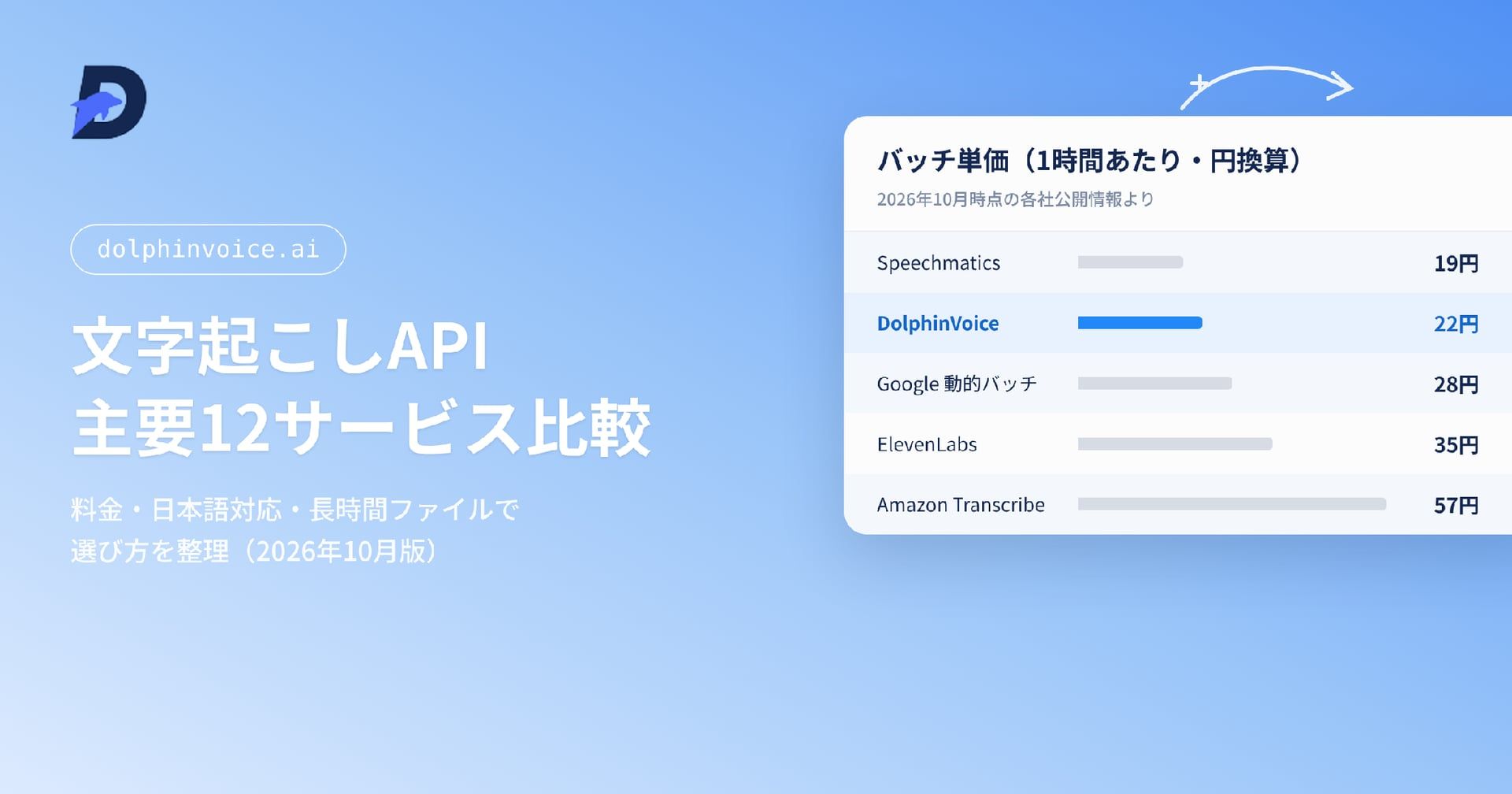
 Batch transcription API prices per audio hour, converted to Japanese yen
| Service | Batch price per audio hour | Free allowance | File limit | Speaker Separation | On-premises |
|---|---|---|---|---|---|
| DolphinVoice (our service) | ¥22 standard, tax included; ¥66 rapid | 600 minutes plus 10,000 TTS characters monthly | 1GB audio; 2GB video; 5 hours | Yes | Yes |
| AmiVoice | From ¥79.2, tax included, general-purpose engine with logging | 60 minutes per engine monthly | Not stated | Yes | Private offering |
| NTT TechnoCross SpeechRec | Annual license; undisclosed price | Not stated | Not stated | Yes | Yes |
| Google Cloud STT | Standard $0.016/min, about ¥152; Dynamic Batch $0.003/min, about ¥28 | 60 minutes monthly, V1 only | Not stated | Not listed in Japanese-language row | Unconfirmed |
| Amazon Transcribe | $0.006/min, about ¥57 | 60 minutes monthly for new users’ first 12 months | Not stated | Up to 30 speakers | Unconfirmed |
| Azure AI Speech | Standard price unconfirmed; MAI-Transcribe-2 $0.10/hour, about ¥16 | 5 hours monthly, realtime only | Not stated | Yes | Containers |
| OpenAI | gpt-4o-mini $0.003/min, about ¥28; gpt-transcribe $0.0045/min, about ¥43 | Not stated | 25MB | Dedicated diarize model | Unconfirmed |
| ElevenLabs Scribe v2 | $0.22/hour, about ¥35 | Plan includes usage hours | 1GB / 4.5 hours | Up to 32 speakers | Unconfirmed |
| Deepgram Nova-3 | Multilingual/Japanese $0.0052/min, about ¥49 | $200 credit | Not stated | Yes | Enterprise |
| AssemblyAI | Universal-2 $0.15/hour, about ¥24; Universal-3.5 Pro $0.21/hour, about ¥33 | 185 prerecorded hours | Not stated | Additional $0.02/hour | Unconfirmed |
| Speechmatics | Melia 1 $0.12/hour, about ¥19; Enhanced $0.38/hour, about ¥60 | $100 credit | On-premises: 2 hours / 4GB | Three modes | Yes |
| Self-hosted Whisper | No license fee; you pay GPU costs | — | Depends on your infrastructure | Separate implementation | Yes |
Azure’s standard price could not be retrieved from its dynamically rendered pricing page. MAI-Transcribe-2’s $0.10/hour price is stated in the official blog as valid through December 31, 2026; it is a preview and Japanese support is not explicitly stated. Deepgram’s Japanese rate is multilingual, not the $0.0043/min English monolingual rate. AssemblyAI’s streaming Speaker Separation costs an additional $0.12/hour.
12 options: features and deployment considerations
The following sections cover Japanese providers, global platforms, specialists, and self-hosting. DolphinVoice is discussed separately afterward.
AmiVoice Cloud Platform: models for medical and financial terminology
Advanced Media’s AmiVoice is one of Japan’s best-known services. Its main strength is its range of domain-specific engines. General-purpose asynchronous HTTP processing costs ¥79.2/hour with logging and ¥99/hour without it. Medical engines cost ¥148.5–222.75/hour; finance, insurance, and multilingual engines cost ¥118.8–148.5/hour. Each engine includes 60 free minutes monthly, and only speech segments are billed. The service has ISO/IEC 27001 certification, registration IS 816102.
Considerations: if recordings cannot be retained externally, the no-logging option effectively increases your cost. The public page lists tax-inclusive prices only; tax-exclusive rates were not confirmed.
NTT TechnoCross SpeechRec: an on-premises speech recognition platform
SpeechRec supports realtime WebSocket processing, speaker diarization that classifies utterances even when several speakers share one channel, and user dictionaries. It can run on-premises or in a private cloud, making it easier to meet procurement requirements at large Japanese organizations.
Considerations: prices are not public. Annual licensing is based on Concurrent Connection counts, so you cannot start with small Pay-as-you-go usage. Initial technical evaluation also requires a sales discussion.
Google Cloud Speech-to-Text: process large volumes with Dynamic Batch
The V2 API offers Chirp and Chirp 2, with automatic punctuation, model adaptation, and word-level confidence for Japanese. The standard rate is comparatively high at $0.016/minute, about ¥152/hour, but Dynamic Batch costs $0.003/minute, about ¥28/hour—roughly 81% less. It can suit large workloads that do not need immediate results. Volume tiers reduce the rate to $0.010/minute above 500,000 monthly minutes, $0.008 above one million, and $0.004 above two million. Audio and transcripts are not logged by default.
Considerations: V2’s pricing table does not list a free allowance; the 60-minute monthly allowance is for V1. Speaker Separation is not listed in the Japanese row of the language table. Each channel is billed separately, effectively doubling cost for two-channel recordings. The latest official release-note update found for this article was November 2025; major developments during 2026 were not confirmed.
Amazon Transcribe: integration within AWS
Batch processing costs $0.006/minute, about ¥57/hour; streaming costs $0.01/minute. Japanese and custom language models are supported in both modes. Speaker Separation handles up to 30 speakers, and new users receive 60 free minutes monthly for 12 months. Within AWS, workflows can trigger Lambda from files placed in S3 or process Amazon Connect recordings directly. Add-ons such as automatic content redaction and generative call summaries can reduce implementation work.
Considerations: Japanese does not support acronyms or PII redaction. Call Analytics supports post-call analysis, not realtime analysis. Data may be used for training by default, so an AWS Organizations opt-out policy is an important item for IT review.
Microsoft Azure AI Speech: cloud and container options
Azure supports Japanese Fast transcription. Custom Speech can be adapted with phrase lists and structured text. Realtime processing explicitly does not retain or store customer data. Speech to text containers are generally available for on-premises deployment.
Announced in September 2026, MAI-Transcribe-2 costs $0.10/hour, about ¥16, the lowest price level in this comparison. The official blog states that this price runs through December 31, 2026.
Considerations: MAI-Transcribe-2 is in preview. The official blog lacks a language list, so Japanese support is unconfirmed; it also gives inconsistent language counts of 60 and 43. Standard Speech to text rates could not be confirmed because the pricing page uses JavaScript rendering. Use Azure’s pricing calculator for deployment estimates. Disconnected containers require an application and an approval process of approximately ten business days.
OpenAI: connect transcription with summarization
The main gpt-transcribe model costs $0.0045/minute, about ¥43/hour. Other options include gpt-4o-transcribe at $0.006/minute and gpt-4o-mini-transcribe at $0.003/minute, about ¥28/hour. For Speaker Separation, gpt-4o-transcribe-diarize returns JSON with Speaker Labels. Summarization, Meeting Minutes formatting, and action-item extraction can follow transcription on the same platform, using an existing OpenAI SDK.
Considerations: the 25MB upload limit is restrictive for long recordings, which require splitting. Word- and segment-level timestamps are supported only by the legacy whisper-1 model, limiting subtitle workflows. The official guide did not provide an explicit supported-language list in the review for this article, making formal confirmation of Japanese support difficult.
ElevenLabs Scribe v2: long recordings and large meetings
Known for Text-to-Speech (TTS), ElevenLabs expanded its transcription offering with Scribe v2 in the second half of 2026. Batch processing costs $0.22/hour, about ¥35. Scribe v2 Realtime over WebSocket costs $0.39/hour, about ¥62.
The 1GB / 4.5-hour file limit allows long meetings and seminars to be submitted without splitting. Speaker Separation supports up to 32 speakers. Optional role detection distinguishes agents and customers for an additional 10%, making the service relevant to meetings and Call Center recordings. Japanese appears in the official documentation’s high-accuracy language group.
Considerations: realtime latency is quoted as 150ms, but the same page also says under 100ms. The FAQ does not answer whether realtime Speaker Separation is supported, so this remains unconfirmed. An on-premises offering was not confirmed either.
Deepgram: self-hosting and domain-specific models
Deepgram offers prerecorded and streaming processing around its Nova-3 family. Japanese uses multilingual pricing: $0.0052/minute for prerecorded audio, about ¥49/hour, and $0.0058/minute for streaming. In the second half of 2026, it added streaming-only Flux, Nova-3 Pharma, and multilingual support for Nova-3 Medical. A $200 trial credit requires no card and has no expiration.
Self-hosting supports Docker/Podman, Kubernetes, bare metal, and Amazon SageMaker. Deepgram states that self-hosted configurations do not send audio, transcripts, or identifying information in request content to Deepgram.
Considerations: Docker/Kubernetes self-hosting requires an Enterprise plan with custom pricing. Current streaming prices are marked as a limited promotion. Regular rates are $0.0077/minute for monolingual and $0.0092/minute for multilingual processing. No promotion end date is published, so do not base long-term cost estimates only on promotional prices. Custom dictionaries are limited to 100 words.
AssemblyAI: compare free allowances and model features
Prerecorded Universal-2 costs $0.15/hour, about ¥24; Universal-3.5 Pro costs $0.21/hour, about ¥33. The free allowance includes 185 prerecorded hours and 333 streaming hours, making evaluation inexpensive. Universal-3.6 Pro was added in the second half of 2026, expanding streaming to 32 languages.
Japanese support has changed since August 2026. Universal-3.5 Pro Streaming and Universal-3.6 Pro Streaming now support Japanese, while the cheaper Universal-Streaming model at $0.15/hour still supports only six languages without Japanese. Check the model name alongside the price.
Considerations: Speaker Separation adds $0.02/hour for prerecorded audio and $0.12/hour for streaming. An official on-premises offering was not confirmed.
Speechmatics: batch processing and on-premises options
Following a small price reduction in the second half of 2026, Melia 1 batch processing costs $0.12/hour, about ¥19; Standard costs $0.23/hour and Enhanced $0.38/hour. The medical-specific Oak 1 Medical was added at $0.15/hour. Batch pricing is among the lowest in this comparison, with volume discounts of up to 25% above 500 monthly hours.
Custom dictionaries allow up to 1,000 words per job, with full-width hiragana and katakana pronunciation hints for Japanese. Speaker Separation has three modes, and deployment options include Cloud, On-Premises, and On-Device.
Considerations: the language page does not explicitly distinguish Japanese availability for batch and realtime, and notes that availability depends on the contract. Confirm this in advance. On-premises features are more limited than SaaS. Prices of both $0.12 and $0.121 appear on the pricing page, leaving the third decimal place unclear.
Self-hosted Whisper: account for GPU and operating costs
A zero license fee is attractive, but operating the service means paying for GPU servers, model updates, monitoring, and incident response. Once enough GPUs to handle concurrent workloads are included in total cost of ownership (TCO), cloud APIs are often cheaper below a certain monthly volume. Speaker Separation, custom dictionaries, and punctuation also require separate implementation. Include the engineering effort needed to reproduce features supplied by commercial APIs.
GPU-based systems and commercial engines that run on CPUs have different server-cost structures. Before assuming an on-premises requirement means Whisper, compare CPU-based commercial engines too.
DolphinVoice: yen pricing and on-premises deployment
This section covers our own service. We present both published figures and cases where it is not the best fit, using the same criteria as above.
Pricing, free allowances, and file limits
Audio File Transcription costs ¥22/hour for standard processing and ¥66/hour for rapid processing. Real-time Speech Recognition costs ¥66/hour. All prices are in yen, include tax, and have no fixed monthly fee. For one hour of audio, Processing Speed is as fast as ten minutes with standard processing or two minutes with rapid processing.
 DolphinVoice pricing and usage limits
The monthly free allowance includes 600 minutes of Speech Recognition and 10,000 characters of Text-to-Speech (TTS). Free usage supports ten concurrent Channels for Realtime Recognition and two for Audio File Transcription. Business customers using more than 5,000 hours monthly receive tiered pricing. We also publish availability and other service conditions.
File limits are 1GB for audio, 2GB for video, and five hours in length. Standard processing accepts WAV, PCM, OPUS, MP3, MP4, M4A, AMR, 3GP, and AAC. Output can use Transcript Format or Subtitle Format. Supported languages are Japanese, English, and Chinese, including mixed Chinese-English and Japanese-English speech.
Recognition features and deployment
Features include Hotwords and custom dictionaries, configurable blocked words and Forced Replacement, Speaker Identification, Speech Rate Calculation, Disfluency Detection, and ITN (Inverse Text Normalization).
Our underlying architecture is developed in-house and centered on CPUs, allowing configurations that do not require GPU servers. On-premises deployments run within customers’ facilities and managed servers. Prices are the same with or without logging, so requirements against leaving recordings externally do not increase the rate. Our security page describes support for ISO 27001, SOC 2, and APPI (Act on the Protection of Personal Information).
Commercial Use in Call Center and AI Meeting Minutes applications amounts to 13,000–15,000 audio hours per day. Public examples include Cloopen’s SimpleConnect cloud CTI and 三通テレコムサービス’s クラコールPBX/AI通話メモ. See the customer stories for published deployments.
Suitable uses and reasons to consider alternatives
A good fit: embedding Japanese call and meeting transcription in your product while fixing costs in yen; handling long files without splitting; or meeting on-premises requirements with a limited GPU-server budget. We provide free initial technical support through web meetings, phone, and email, which can help teams with limited evaluation capacity.
A less suitable fit: broad multilingual expansion, because DolphinVoice focuses on Japanese, English, and Chinese. Speechmatics or ElevenLabs may be more suitable when language coverage is the priority. If batch price alone is decisive, Speechmatics Melia 1 at roughly ¥19/hour is cheaper. Our brand is also less well known than global platforms. Where a medical or financial domain-specific model determines accuracy, AmiVoice’s specialized engines are strong candidates.
Choosing priorities for your use case
 A transcription API selection flow based on the intended use case
AI Meeting Minutes: long recordings and multiple speakers
file limits are an early filter. OpenAI’s 25MB cap requires splitting, whereas ElevenLabs (1GB / 4.5 hours) and DolphinVoice (1GB audio, 2GB video, five hours) accept larger recordings directly. Also compare speaker limits—32 for ElevenLabs and 30 for Amazon Transcribe—and measure the time needed to process an audio hour.
Call Center analysis: specialist vocabulary and processing costs
if two-channel recordings are available, channel separation is a reliable option. Focus on Japanese terminology dictionaries and high-volume pricing. Yen-priced candidates include DolphinVoice at ¥22/hour and AmiVoice from ¥79.2/hour. If dollar billing is acceptable, Speechmatics at about ¥19/hour and AssemblyAI at about ¥24/hour are low-cost alternatives.
Video subtitles: timestamps and language coverage
word- and segment-level timestamps are essential. OpenAI’s main models do not support these; only legacy whisper-1 does. For multilingual publishing, Speechmatics’ and ElevenLabs’ language coverage is relevant.
Healthcare, finance, and government: keeping data in-house
candidates include Azure containers, Deepgram Enterprise, Speechmatics, AmiVoice API Private, NTT TechnoCross SpeechRec, and DolphinVoice. Domain-specific options include AmiVoice’s medical and financial engines, Deepgram Nova-3 Medical/Pharma, and Speechmatics Oak 1 Medical. GPU requirements again materially affect total cost.
Cost control: include exchange rates and add-on fees
Speechmatics Melia 1 at about ¥19/hour, DolphinVoice standard at ¥22/hour including tax, AssemblyAI Universal-2 at about ¥24/hour, Google Dynamic Batch at about ¥28/hour, and OpenAI gpt-4o-mini-transcribe at about ¥28/hour occupy a similar range. Whether you need fixed yen costs helps distinguish them from dollar-priced options.
Five checks before deployment
1. Evaluate accuracy with real recordings
Use at least 30 minutes, preferably two hours, of actual calls and meetings rather than demo recordings. Include noise, overlapping speech, and specialist vocabulary, with manually prepared reference transcripts.
2. Measure file limits and processing time
Measure upload limits, timeouts, and processing times. This establishes whether splitting is required and affects the engineering estimate.
3. Measure improvements from custom dictionaries
Measure the improvement and check whether your proper-noun list fits within the vocabulary limit.
4. Estimate monthly costs with all required features
Include Speaker Separation, timestamps, PII redaction, and other add-ons. Model a 10% exchange-rate move in either direction for dollar pricing and a return to regular prices for promotional offers.
5. Review data handling with legal and IT teams
Document training use, retention, opt-out procedures, and domestic or overseas storage. Do this early, before a late rejection invalidates the technical evaluation.
Transcription API FAQs
How does a transcription API differ from a Speech Recognition API?
Technically, they provide the same capability. In practice, transcription API often means batch processing of recordings, while Speech Recognition API or realtime STT means live text during a call. Rates can differ by 1.5 to 3 times, so define the workflow first.
How should I compare Japanese recognition accuracy?
We did not find a Japanese-specific official WER in the public pages reviewed. Industry-leading claims usually refer to English benchmarks. Recording quality, microphones, noise, speakers, and terminology all affect accuracy. We consider real-data testing the dependable way to compare them.
Can I upload a two-hour meeting recording directly?
It depends on the service. ElevenLabs accepts 1GB / 4.5 hours; DolphinVoice accepts 1GB of audio, 2GB of video, and five hours. OpenAI’s 25MB limit requires splitting and merging. Check this constraint first if long recordings are central to your product.
Does Speaker Separation cost extra?
AssemblyAI adds $0.02/hour for prerecorded audio and $0.12/hour for streaming. ElevenLabs adds 10% for role detection. Amazon Transcribe and Speechmatics include it in the base fee. Where two-channel recording is possible, channel separation often has accuracy and cost advantages.
How can I start evaluating APIs for free?
Choose two or three services with free allowances and submit the same recordings. Examples include AssemblyAI’s 185 prerecorded hours, Deepgram’s $200 credit, Speechmatics’ $100 credit, DolphinVoice’s 600 monthly minutes, and AmiVoice’s 60 monthly minutes per engine.
Next steps: shortlist by requirements and test real audio
A transcription API can be expensive to replace once integrated. Compare several providers on identical audio instead of deciding from a specification sheet alone. To evaluate DolphinVoice, use the following resources.
Start with 600 free minutes each month
Review yen-denominated, tax-inclusive prices and free allowances.
Try your audio in Playground
Submit a real recording and inspect the recognition results.
Discuss your integration requirements
Initial technical support is free through web meetings, phone, and email.
Prices and specifications in this article reflect providers’ official websites as reviewed for October 2026. Dollar prices are converted at ¥158 per US dollar for reference. International providers generally quote dollars excluding tax, while Japanese providers commonly quote tax-inclusive yen prices. Check each provider’s latest official information before selecting a service.
Share Article
Read more
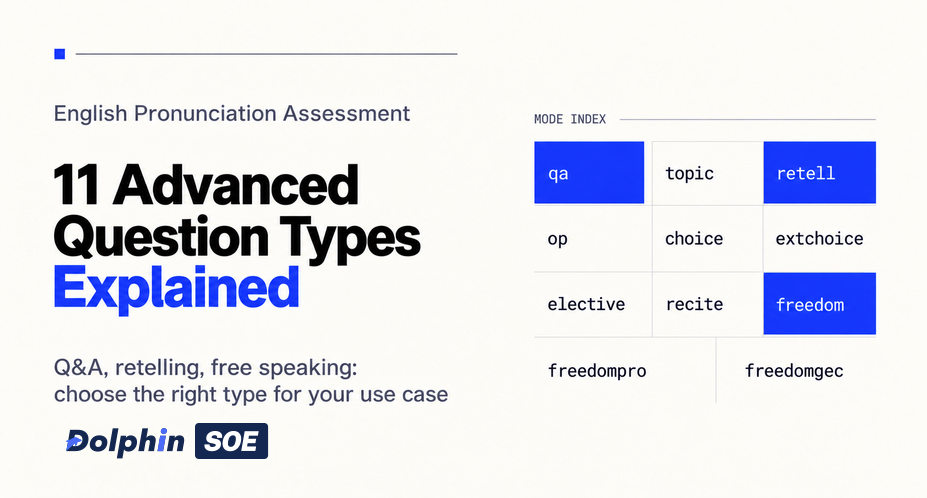
Beyond Reading Aloud: Advanced English Pronunciation Assessment Question Types
Explore 11 advanced DolphinSOE question types, from Q&A and retelling to free speaking, with scoring differences, duration limits, and API parameters.
ASR Transcription Accuracy: Four Factors Behind the Gap Between 80% and 98%
Explore how recording equipment, environment, microphone distance, and speaker behavior affect ASR transcription accuracy, plus Hotwords, Speaker Separation, confidence scores, and offline transcription.
Integrate the Pronunciation Assessment Android SDK in 10 Minutes
Run a DolphinSOE Android demo from trial credentials and AAR setup through engine initialization, recording or file assessment, and result callbacks.