
When teams ask about automatically scoring pronunciation in Japanese training for international staff or a language learning app, their first question is usually simple: what does the API return? Is it just one overall score, or can it identify which sound a learner got wrong? That distinction shapes both the learning interface and the teacher's role.
This article explains the assessment units and returned metrics of the Japanese engine in DolphinSOE, the Pronunciation Assessment API provided by DolphinVoice / DolphinAI Inc. We include the API field names so developers can check the specifications directly. We also explain what the assessment cannot measure and how to use its scores responsibly.
About this article
- The information is based on public product pages, API documentation, and the December 16, 2025 press release, as available in November 2026.
- This article is written by the provider of DolphinSOE. A separate article, “Exploring Options for Implementing Japanese Pronunciation Assessment,” compares other APIs against the same criteria.
What a Pronunciation Assessment API can and cannot measure
A Pronunciation Assessment API takes a recording of a learner reading a prescribed text, compares it with a reference pronunciation, and returns scores. It needs two inputs: the learner's audio and the text they are expected to read, known as the reference text.
This defines a clear boundary between what it can and cannot measure.
 Comparison of the metrics a Pronunciation Assessment API can measure and the abilities outside its scope
| What it can measure | What it cannot measure |
|---|---|
| Whether the reference text was pronounced accurately | Whether freely spoken content is appropriate or uses correct vocabulary and grammar |
| Smoothness of reading, pauses, and speaking speed (Fluency) | Whether a conversation flows naturally or the speaker adapts to the other person |
| Omissions and repetitions (completeness and reading error types) | Official proof of Japanese proficiency; it cannot replace statutory tests or residence status requirements |
| Which characters or sounds received lower scores (character and phoneme results) | |
| How closely the high–low pitch pattern matches the reference (Accent score) |
To assess the content of spontaneous speech, a speaking test that combines Speech Recognition with a large language model is a better fit. Our NihongoScore serves that purpose. A Pronunciation Assessment API is a component focused on reading practice: it pinpoints where and how the learner's pronunciation differs from the reference.
Three assessment units
The DolphinSOE Japanese engine supports words, phrases or sentences, and passages. The request's question type code, mode, selects the unit.
 Word, sentence, and passage assessment units and the metrics returned at each level
| Unit | Mode code | Text to read | Utterance length | Typical use |
|---|---|---|---|---|
| Word | word | Words, short expressions, or kana | Up to 210 seconds | Greetings, numbers, workplace terminology, and repeated practice of difficult sounds |
| Phrase or sentence | sentence | One or several sentences | Up to 400 seconds | Customer service phrases, safety checks, and standard reporting phrases |
| Passage | chapter | Paragraphs or connected text | Up to 400 seconds | Reading explanations and reports, and checking consistency over longer speech |
The duration limits are those listed in the API documentation updated on November 16, 2026.
Word assessment: accuracy of individual sounds
The engine compares individual sounds, or phonemes, such as “か,” “き,” and “く” with the standard pronunciation and scores their accuracy. It also detects omissions and repetitions. The dictionary contains several thousand words commonly used in Japanese learning. Other words can be assessed by including them in the reference text, without advance training.
Sentence assessment: Fluency and pauses
At sentence level, the API returns accuracy together with Fluency, the number of pauses, and speaking speed. The overall score is calculated from accuracy, Fluency, and completeness.
Passage assessment: sentence results within longer speech
For a paragraph or a passage lasting several minutes, the API returns sentence results in sentenceInfo alongside the overall scores. By default, sentence boundaries follow punctuation such as “。,” “?,” and “!.” You can also configure it to split only at line breaks. These results help reveal patterns such as lower scores toward the end of a long reading or frequent omissions in a particular sentence.
Returned assessment metrics
The following sections list the returned metrics alongside their API field names. The scoring range is controlled by scale, which accepts values from 1 to 100. The default maximum score is 100.
Overall scores
| Metric | Field | Meaning | Example use |
|---|---|---|---|
| Overall | overall | Overall pronunciation score | Progress charts and a guide to attainment |
| Accuracy | accuracy | Similarity to the standard pronunciation | Tracking pronunciation accuracy |
| Fluency | fluency.overall | How smoothly the learner read | Evaluating sentence and passage practice |
| Pause count | fluency.pause | Number of pauses during the utterance | Identifying excessive breaks or hesitation |
| Speed category | fluency.speed | Slow (0), normal (1), or fast (2) | Flagging speech that is too fast or too slow |
| Completeness | integrity | How much of the reference text was read | Identifying omissions |
| Accent | tone | High–low pitch Accent score for the utterance | Tracking Accent performance and difficult words |
| Words per minute | wpm | Number of words spoken per minute | Tracking changes in speaking rate |
| Recording duration | waveTime | Actual recording length in milliseconds | Deciding whether to request another recording |
Character and word results: characters
For each character or word in the reference text, the API returns:
- refText / hypothesis: the expected character or word and what was actually spoken.
- overall / accuracy: the overall and accuracy scores for that character or word. Sentence assessment also returns
fluencyandintegrity. - type: the reading classification, such as normal reading or omission, explained below.
- ref_tone / tone_score: the dictionary Accent pattern and the word's Accent score.
- startTime / endTime: the position in the recording, in milliseconds. An app can use these timestamps to play just the relevant audio segment.
Phoneme results: phonemes
Set phonemes to true in the request to receive results for the individual phonemes within each character or word.
- phoneme / pron: the phoneme written in hiragana and katakana.
- score: the pronunciation score for that phoneme.
- hypothesis: the sound that was actually pronounced.
- tone: the reference pitch, with 0 for low and 1 for high.
- startTime / endTime: the position in the recording, in milliseconds.
For Japanese, these phoneme units roughly correspond to individual kana characters. The API documentation's phoneme mapping also treats “ん,” “っ,” and “ー” as separate units.
Audio quality: audioInfo
The API also returns information about recording noise (snr), clipping (clip), and volume (volume). When a score is low, these values help distinguish a pronunciation problem from a recording problem. They can also inform prompts such as “Please record again in a quiet place.”
Four reading classifications
The type field in character and word results uses the values below. Knowing the type of reading issue, as well as the score, lets an app tailor its feedback.
 The normal, delete, repeat, and oov reading classifications with examples of learner feedback
| type | Meaning | Example feedback in a learning app |
|---|---|---|
| normal | Read correctly, or read with a nonstandard pronunciation | No special marking, or different colors based on the score |
| delete | Omitted | Highlight the missing characters |
| repeat | The same part was repeated | Record the frequency of repetitions or restarts |
| oov | Not in the dictionary, with no automatically determined reading, so it cannot be scored | Specify the reading and assess again, as described below |
Handling features specific to Japanese
Moraic nasals, geminate consonants, and long vowels
Sounds represented by “ん,” “っ,” and “ー” contribute to Japanese mora timing and can be difficult for learners whose first language lacks them. DolphinSOE treats them as phoneme units, so learners can see scores for specific sounds, such as “っ” in “きって(切手)” or “ん” in “せんせい.”
Accent results include a reference pattern and a score
At character or word level, ref_tone contains the dictionary Accent pattern. In common notation, a flat pattern is shown as “◎,” while “①” through “⑥” indicate the mora after which the pitch falls. The API uses "0" through "6", or a value such as "0/1" when a word has multiple patterns. The phoneme-level tone field gives the reference high or low pitch for each mora. The engine update released in November 2026 also returns scores for the learner's Accent: tone at utterance level and tone_score within characters at word level.
These values let a learning interface show that a word has an initial-high pattern or indicate which mora should have a high pitch. Japanese high–low Accent is not visible in ordinary text, so a visual reference can reduce work for learning material creators. Combined with scores, it can also identify words whose Accent differs from the reference.
Specifying the intended reading
Japanese includes kanji with multiple readings, as well as proper nouns and workplace terms that may not be in the dictionary. Specifying the reading in the reference text lets the engine assess the intended pronunciation.
- Add a reading to one character:
私(わたくし)は日本料理が大好きです。 - Add a reading to multiple characters:
[明日](あす)の試合は… - Pass word–reading pairs through the
pronunciationrequest parameter.
The same approach can make a word assessable after it receives an oov classification.
Using the scores
Keep the settings consistent when comparing results. Scoring leniency is controlled by looseness, from 0 to 9, with higher values being more lenient. The score range (scale) and score adjustment coefficient (ratio, from 0.8 to 1.5) are also configurable. Use the same settings when comparing learners or results before and after training.
Keep recording conditions consistent. Audio should be mono at 16 kHz. Noise and clipping affect scores. Using audioInfo to prompt a new recording can reduce score variation.
Do not make employment decisions from scores alone. Pronunciation Assessment is a tool for diagnosis and learning support during training. Important decisions such as hiring or placement should include review by a teacher or responsible staff member, rather than being automated solely from scores.
The assessment does not replace official tests. Japanese language requirements under schemes such as 育成就労制度 must be met through the tests or courses specified by the scheme. The separate article “Japan's 育成就労制度 in 2027: What Mandatory Japanese Language Education Means for Training System Developers” discusses that relationship.
Three training scenarios
| Scenario | Assessment unit | Metrics to review | How to use them |
|---|---|---|---|
| Basic practice before starting work | Word | Phoneme score and type | Assess greetings, numbers, and workplace terms to identify sounds each learner should review |
| Workplace phrases after placement | Phrase or sentence | overall, fluency, integrity | Regularly assess safety checks, customer service phrases, and reporting phrases, and track attainment |
| Explanation and reporting practice | Passage | Sentence results, pause count, and speaking speed | Read longer explanations and review pauses and pace to work toward clearer delivery |
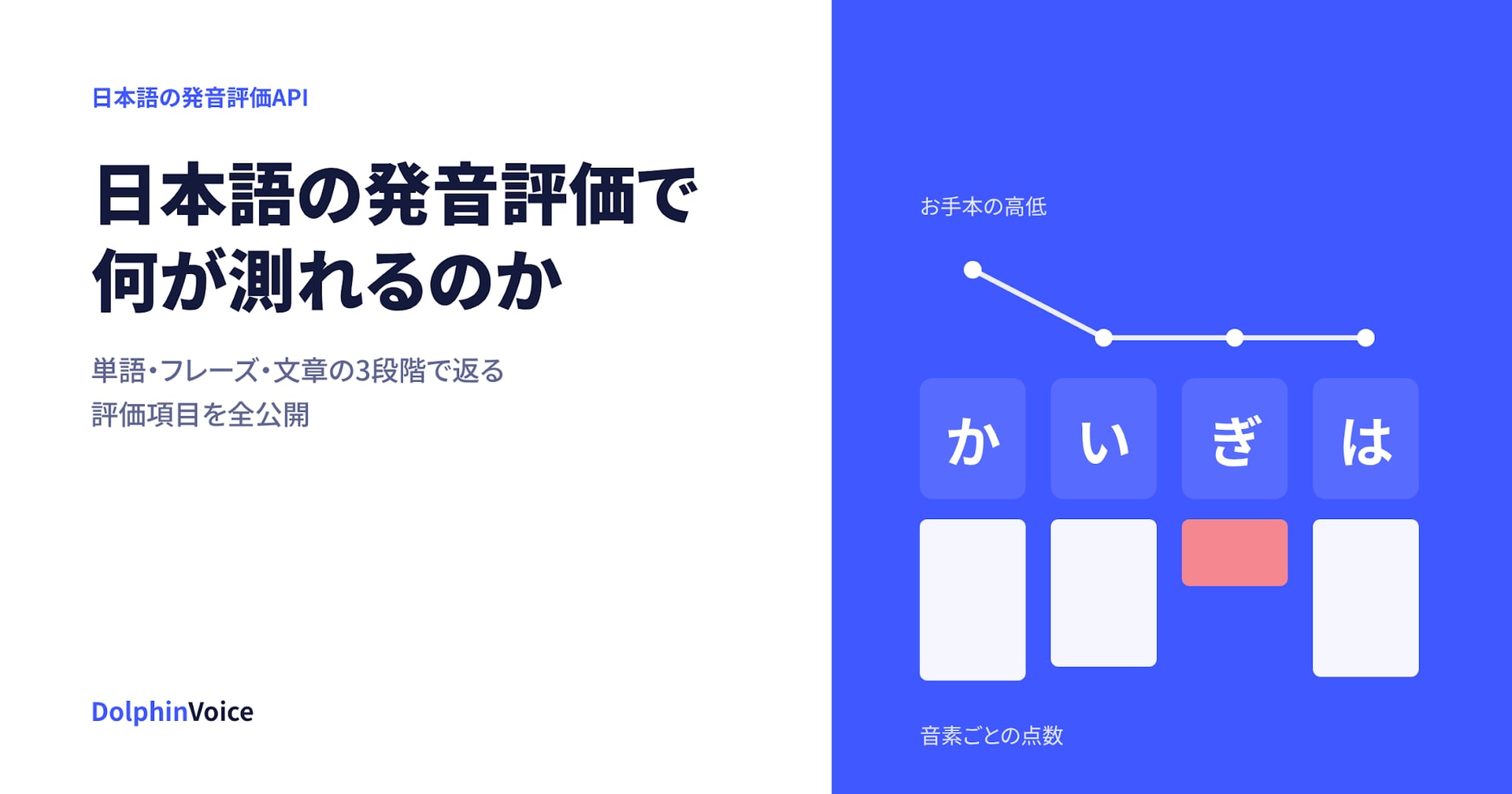
A learning app can color characters by phoneme score, show different messages for each error type, display Accent references using ref_tone and tone, and use tone_score to identify words with Accent differences.
 Illustrative learning screen with score-based text colors, phoneme scores, and a high–low Accent reference; the numbers are examples, not measured results
See the results in the interactive demo
The interactive demo requires no login and shows how the results appear in practice. Record using your browser's microphone to see the overall score and phoneme results within a few seconds. For Japanese, you can try kana, words, sentences, and passages.
Service terms
As reported in our August 2026 blog, Japanese Pronunciation Assessment is used approximately 100,000 times per day. The Japanese engine is available on the Pro plan. As of November 2026, the terms below exclude tax:
- JPY 100,000 per month, including 200,000 calls.
- JPY 0.5 for each additional call.
- A 12-month contract.
- English Pronunciation Assessment is available under the same contract.
A separate implementation guide will walk through API authentication, requests, and reading the results.
Frequently asked questions
Can it assess freely spoken Japanese?
The Pronunciation Assessment API evaluates speech read from a reference text. To assess vocabulary, grammar, and logical structure in spontaneous speech, consider the NihongoScore speaking test.
Can this assessment satisfy the Japanese language requirements of 育成就労制度?
No. DolphinSOE supports pronunciation diagnosis and learning during training. It does not replace official tests, statutory courses, proof of Japanese proficiency, or decisions concerning residence status.
Can it be integrated into a mobile app?
Alongside the HTTP API, SDKs are available for Android, iOS, Flutter, and browsers (H5). Japanese assessment is provided online.
Can scoring strictness be adjusted?
Yes. Set looseness from 0 to 9 and ratio from 0.8 to 1.5. Adjust them to suit the learners' level, and keep the settings consistent when comparing results.
Can it assess internal terminology that is not in the dictionary?
Yes. Add the reading to the reference text or specify it through a request parameter.
Try Japanese Pronunciation Assessment
See the actual assessment results in the demo, with no login required.
Evaluate your own learning materials and audio
Contact us to discuss a technical evaluation using your materials or learners' recordings.
This article is based on public information available in November 2026. Specifications and pricing may change. Check the product page and API documentation for the latest details.
References
- PR TIMES, “Japan-developed Japanese AI Pronunciation Assessment Feature Released,” December 16, 2025: press release.
- DolphinVoice Japanese Pronunciation Assessment API product page.
- DolphinSOE API documentation: Japanese word, sentence, and chapter modes, the data dictionary, and specifying Japanese readings.
- Interactive demo.